
Barueri
Ult. Alteração: 27/01/2026
Alterado por: Henrique
NotaFiscalEletronica > Aba "Geração NFSe Invoicy" > Botão "Configurações":
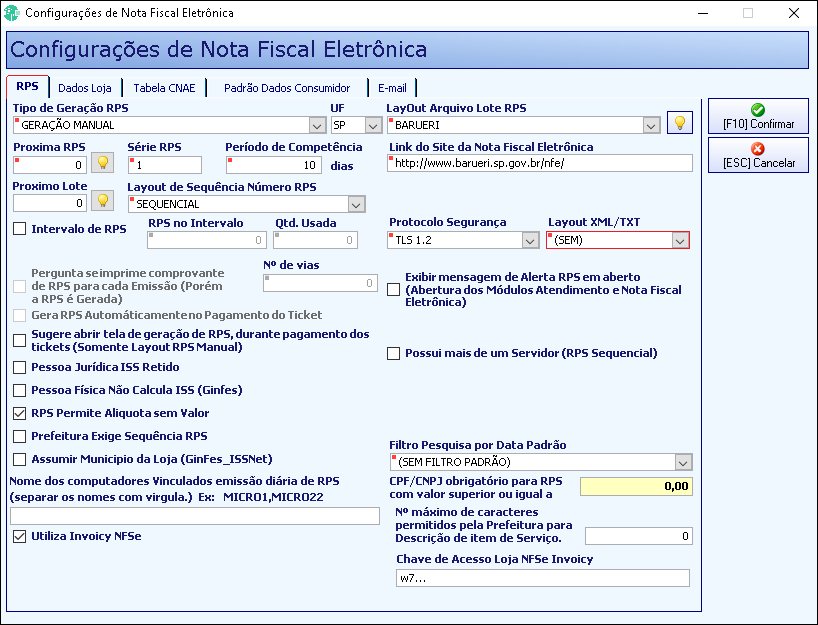
Aba "RPS":
Tipo de Geração RPS = "Geração Manual".
UF = "SP".
LayOut Arquivo Lote RPS = "Barueri".
Protocolo Segurança = "TLS 1.2".
Layout XML/TXT = "(SEM)".
Marcar a Opção = "RPS Permite Aliquota sem Valor".
Marcar a Opção = "Utiliza Invoicy NFSe".
Chave de Acesso Loja NFSe Invoicy = "Digite a chave...".
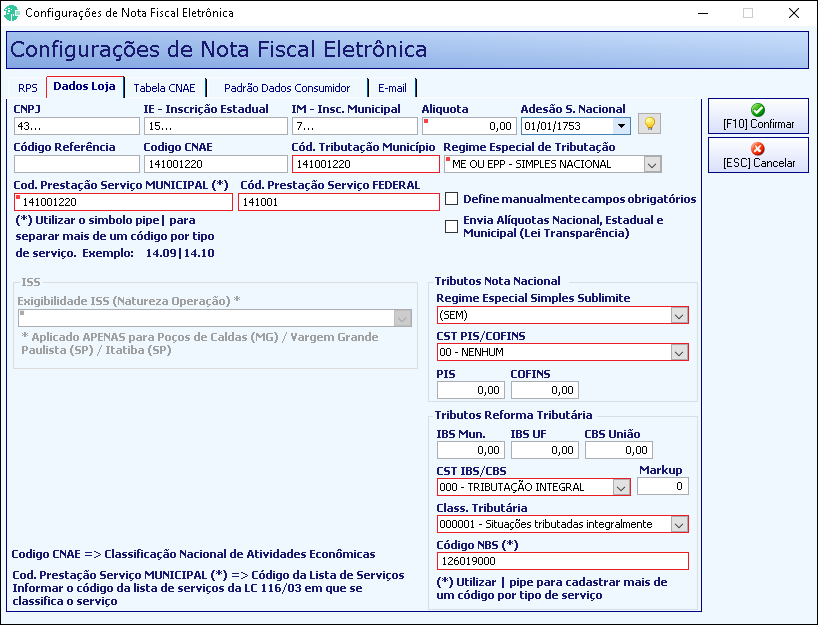
Aba "Dados Loja":
Aliquota = "0,00".
Codigo CNAE = "141001220".
Cód. Tributação Município = "141001220".
Regime Especial de Tributação = "ME OU EPP - SIMPLES NACIONAL".
Cod. Prestação Serviço MUNICIPAL(*) = "141001220".
Cód. Prestação Serviço FEDERAL = "141001".
Regime Especial Simples Sublimite = "(SEM)".
CST PIS/COFINS = "00 - NENHUM".
CST IBS/CBS = "000 - Tributação Integral".
Class. Tributária = "000001 - Situações tributadas Integralmente".
Código NBS (*) = "126019000".
_
Created with the Personal Edition of HelpNDoc: Don't be left in the past: convert your WinHelp HLP help files to CHM with HelpNDoc