
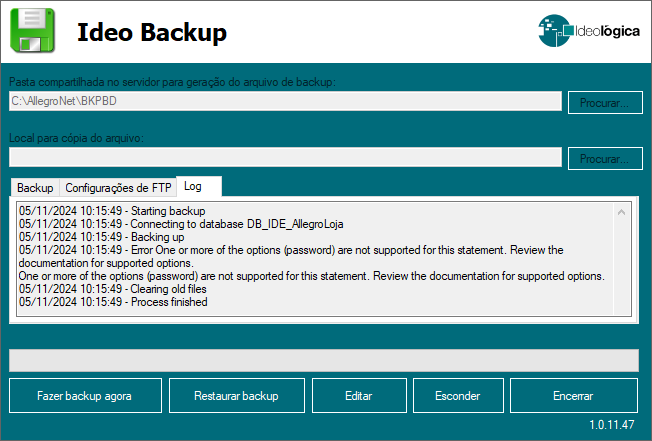
One or more of the options (password)
Ult. Alteração: 05/11/2024
Alterado por: Henrique
One or more of the options (password) are not supported for this statement.
Review the documentation for supported options.
Fechar os sistemas AllegroNet.
1º Atualizar o sistema.
Abra o Atendimento e verifique se o backup está sendo realizado.
Somente se o problema persistir, execute o 2º passo.
2º Na rede da Hybex, acesse P:\Executaveis\AllegroNet e copie os arquivos
(IdeoBackupUI.exe, ICSharpCode.SharpZipLib.dll e BackupExterno.exe).
Cole na pasta C:\AllegroNet da Loja (substituindo-os).
_
Created with the Personal Edition of HelpNDoc: Full-featured Kindle eBooks generator